How far behind the headset’s own view of the room is the robot’s camera image in a VR headset? We measure it against passthrough — the headset’s own outward cameras, which show the operator the room as close to live as the headset gets. Reading a clock off a monitor or a row of LEDs fails, because a 20–30 ms camera exposure averages the fast digits away. Instead, one LED spins on an arm over a marker board; a single headset recording sees it twice, via passthrough and via the robot’s camera, and the phase gap between the two divided by the shared rotation speed is the lag. No clock needs synchronising. Over eight recordings per stack, rhoyn on a stock D435 averages +0.1 ms (−4.3 to +6.9) — no measurable offset from passthrough — while XRoboToolkit on a ZED Mini runs +34.8 ms behind (+25.7 to +41.2). The two sets never overlap.
Contributions
- A clock-free rig: one LED spinning over an A0 marker board, seen in a single headset recording both via passthrough and via the robot’s camera.
- A method that turns exposure blur into precision: track an angle, not a digit, and fit a line across the whole clip to resolve well below the 30 fps frame interval.
- 8 recordings per stack: rhoyn +0.1 ms mean vs +34.8 ms for XRoboToolkit + ZED Mini, no overlap, 34.7 ms median gap.
- Everything open: measurement program, printable board, the arm’s OpenSCAD source, STLs and bill of materials, and the raw recordings. github.com/rhoyn/teleop-camera-latency-analysis
1A lagging camera shows you where your hand was
Most humanoids today don’t use vision at all: a new Unitree G1 arrives with its head camera unplugged, balancing on its IMU — the inertial measurement unit, accelerometers and gyroscopes that sense tilt and acceleration. An inner ear, not eyes. Where a camera is fitted, it’s bolted on with no integration.
The open route a search turns up is GR00T-WholeBodyControl with XRoboToolkit for PICO VR: XRoboToolkit on a PICO headset streams the robot’s camera to you and sends your controller and body pose back to drive the robot’s joints. Its video sender runs on the G1’s Orin board — the robot’s onboard developer computer, the one you’re allowed to SSH into — but natively supports only one camera, and it isn’t the D435 already on the robot’s head. It’s the ZED Mini.
So you tape a ZED Mini to the robot’s head, and the headset shows what the robot sees. But move a hand in view of the robot’s camera and the image lags behind — you’re looking at where your hand was, not where it is. Fine for waving at the robot from across the room. Not fine for precise manipulation, where you need to react to now, not to a moment ago. You can feel the lag. You can’t yet measure it.The stock setup in photos · G1 head, PICO headset, ZED Mini



2Clocks on a screen fail: the exposure averages the digits away
A millisecond timestamp on a monitor. Point both the robot’s camera and the headset’s passthrough at it, record the headset, diff the two readings. But the camera sums all the light that arrives while its shutter is open: digits that change during the exposure land on top of each other as a grey smear. And the monitor only redraws sixty times a second, so most milliseconds never reach the glass at all.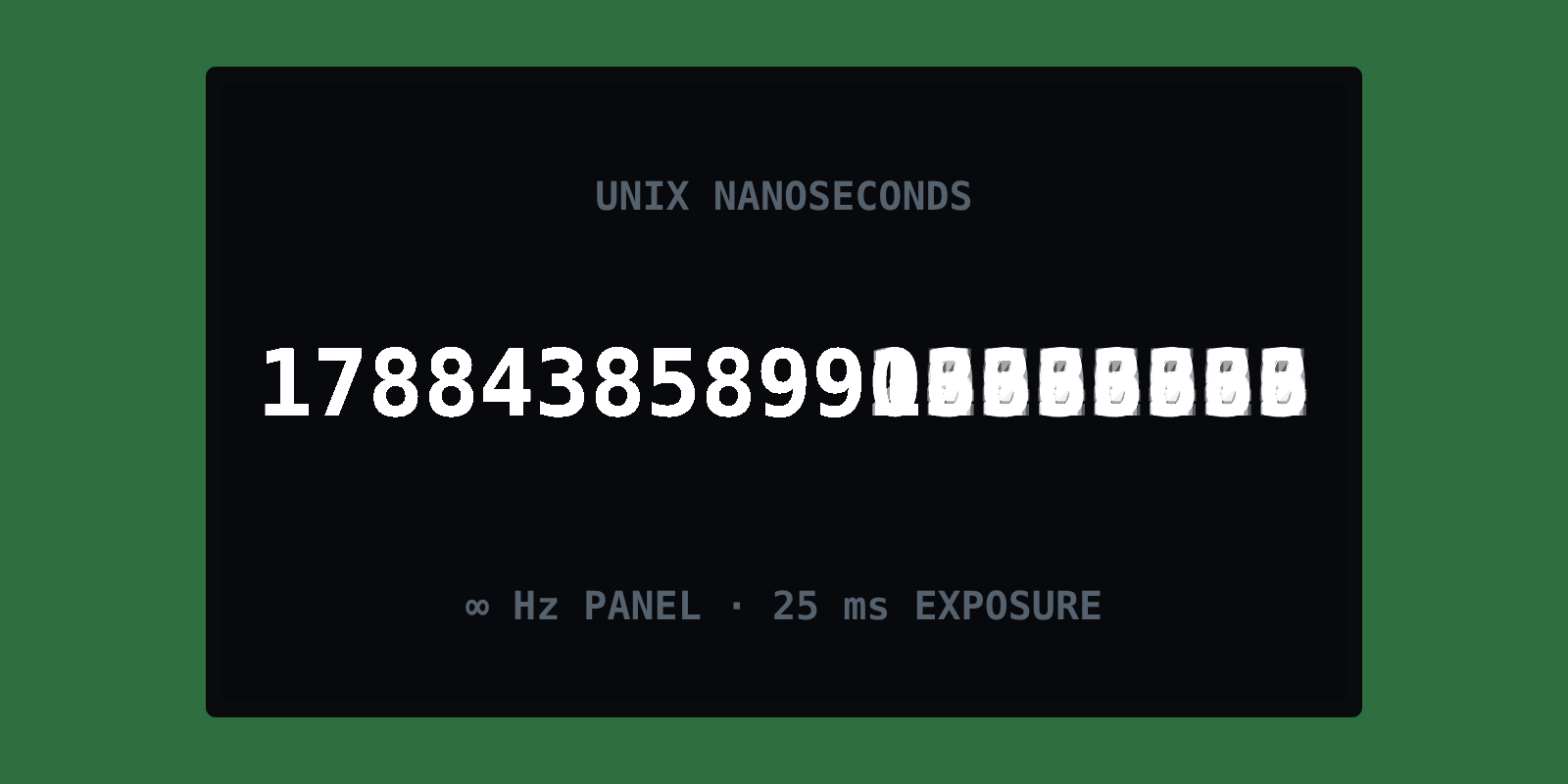
Ten LEDs counting in binary. An ESP32 microcontroller drives ten LEDs at 1 kHz, encoding the millisecond count; 210 states cover a full second at 1 ms resolution. The display is no longer the bottleneck — it updates every millisecond, exactly as built. The camera is: a 20–30 ms exposure is ordinary indoors, and any bit that flips faster than that averages to grey.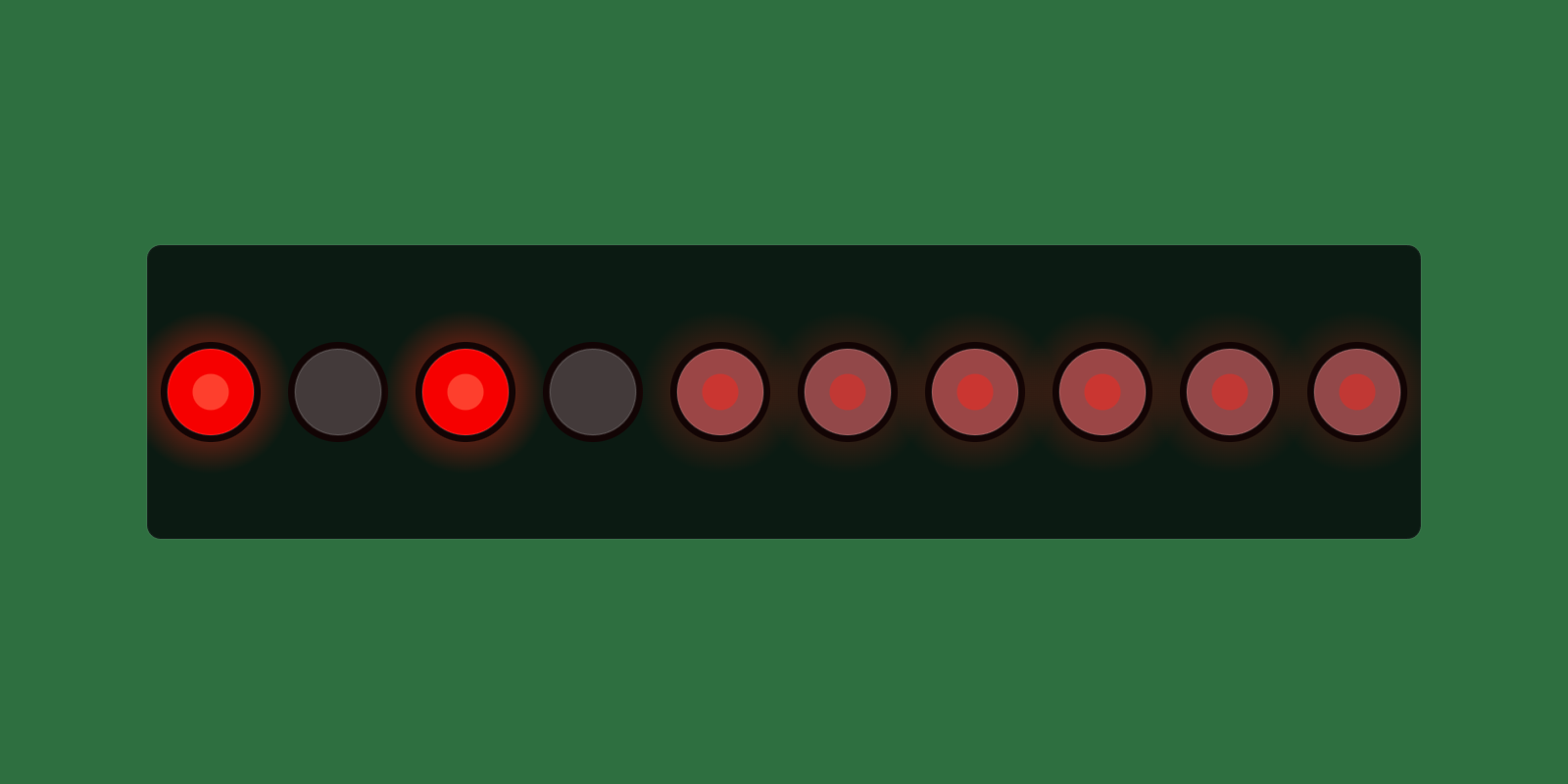
Exposure and refresh rate: two separate ways to lose the same number. Both attempts failed the same way — reading a number off a display while the exposure averages it away. A camera doesn’t capture an instant: it opens the shutter, exposes the sensor to photons for the whole window, and records however those photons landed. The video shows a mechanical shutter rather than a digital sensor; the mechanism differs, but the idea is the one behind every frame in this piece.Why a frame blurs at all · a video on how a shutter exposes the sensor
3One LED, two routes, no clock to synchronise
So stop reading numbers: track something that moves continuously, and let the same averaging work for us instead of against us.
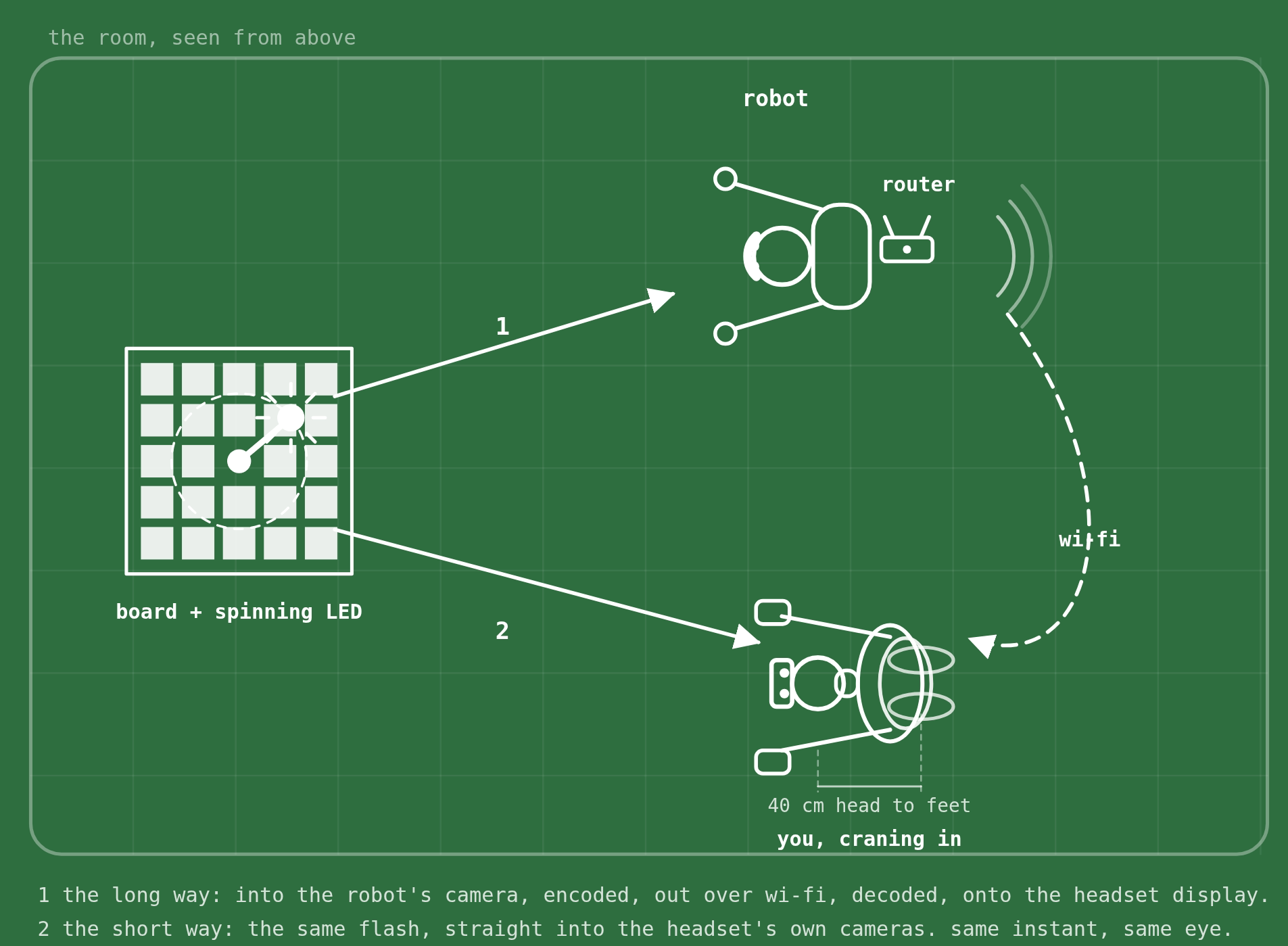
The light from one LED flash reaches the robot’s camera, gets encoded, sent over wi-fi, decoded, and painted on the headset display. The rest of the same flash travels straight into the headset’s passthrough cameras and lands on that same display (Figure 1). Same departure, same destination, two routes. Because both land in the same recorded frame, no clock needs synchronising.
The rig is deliberately dumb: one A0 ArUco board — a printed grid of black-and-white square markers that software can find and locate in an image — with an LED spinning on an arm around its centre, placed where both the robot and the headset wearer can see it. One headset recording holds the same LED at least twice: once via passthrough, once via the robot’s camera stream (three times with a stereo camera). Everything about the views is identical except the transport between them. The arm is the only clock in the experiment.
4The lag is a phase gap divided by a shared speed
For each frame the program fits the board’s pose from its ArUco markers, projects the LED into board coordinates, and records its angle. Because it’s one physical LED, every view traces the same angular speed over time: the fitted lines differ only in phase, and dividing that phase gap by the shared speed turns an angle into a time.
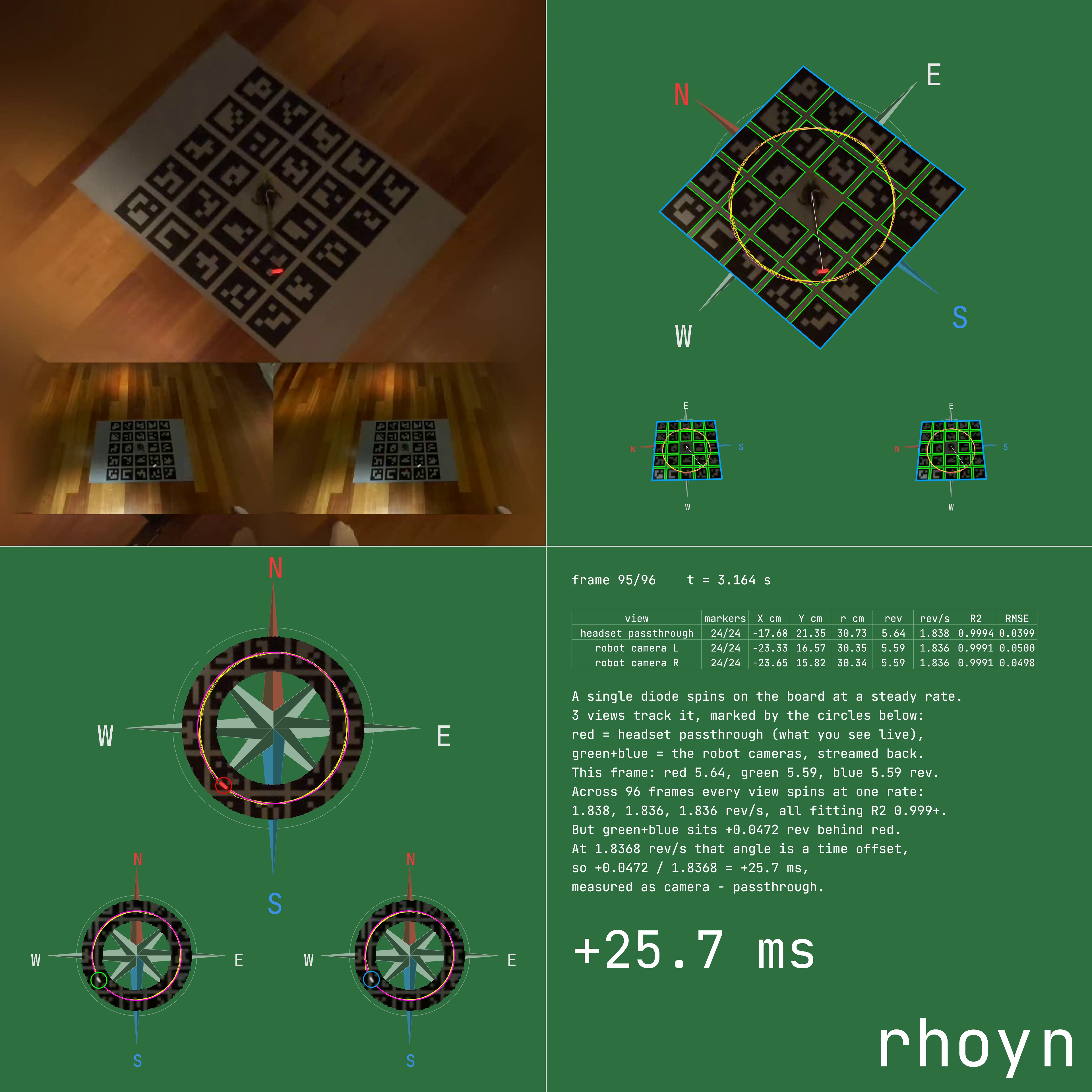
Here exposure stops being the enemy: a long exposure just smears the LED into a short arc, and the middle of that arc is still a well-defined angle. Frame rate stops mattering too: a line fitted across the whole clip averages out per-frame noise and resolves well below the recording’s own frame interval — our numbers come from 30 fps video, whose frames are 33 ms apart, and are reported to a tenth of a millisecond; the clip-to-clip spread, a few milliseconds, is the real noise floor. The arm’s speed doesn’t need to be known, or held constant between clips; it’s measured fresh from each clip and only has to stay steady within one. Nothing is calibrated, trusted, or timestamped. The output is one signed number in milliseconds, camera minus passthrough. One: the recording, untouched. The large view is the headset’s own passthrough; the two strips below are the robot’s left and right cameras, streamed back and composited into the same display. One board, one LED, three views, no clock anywhere. Two: the board’s pose, in every view. Green marks each ArUco marker found — 24 of them, in all three views; blue is the board edge reprojected from that fit, so you can see at a glance whether it’s right. The yellow circle is the LED’s orbit, the white line its current position, and everything outside the board is masked away. Three: the angle. The LED only ever lives on one circle, so the program crops to that ring alone. Magenta marks the orbit; the coloured circle is where each view puts the LED this frame — red for passthrough, green and blue for the robot’s two cameras. The output isn’t a pixel, it’s an angle in degrees. Four: the arithmetic, written out. One row per view — markers found, LED position, revolutions, fitted speed in rev/s, and R² and RMSE, which say whether a straight line was the right fit (R²: the share of the variation the line explains, 1 is perfect; RMSE: the typical distance of a point from the line). Then the result in words. Here all three views turn at 1.838, 1.836 and 1.836 rev/s, and the robot’s two cameras sit 0.0472 rev behind passthrough: +25.7 ms, camera minus passthrough. This clip is the XRoboToolkit + ZED Mini stack, caught in the act.The four panels of every measurement clip · recording, pose, angle, arithmetic
5Results: no measurable offset vs 34.8 ms behind
Eight recordings on each stack, same rig, same program, signed as camera minus passthrough: positive means the robot’s camera view is that far behind what the headset already shows you live. The two sets never overlap. rhoyn runs −4.3 to +6.9 ms, straddling zero — no measurable difference from the headset’s own passthrough. XRoboToolkit + ZED Mini runs +25.7 to +41.2 ms, every clip behind every rhoyn clip. Pairing all 64 combinations and taking the median gap: 34.7 ms.Show as a table
# rhoyn + stock D435 XRoboToolkit + ZED Mini 0 −4.3 ms +25.7 ms 1 −2.4 ms +31.7 ms 2 +6.9 ms +40.5 ms 3 −2.7 ms +39.7 ms 4 +5.5 ms +41.2 ms 5 −1.8 ms +28.7 ms 6 −3.8 ms +35.0 ms 7 +3.1 ms +35.6 ms median −2.1 ms +35.3 ms mean +0.1 ms +34.8 ms
6Limitations
- Different cameras (ZED Mini vs the robot’s D435): this compares whole stacks, camera included, not the software alone.
- This article is the instrument. How rhoyn got its camera link here is a separate article.
7Try it yourself
Everything above in one instrument, nothing switched off. R/F moves the camera latency, T/G the control latency (the hands article), arrow keys move both. Y cycles what’s on the floor — nothing, the monitor, the LED word, the marker board — and H toggles the robot’s camera between stereo and single view. Push the camera to 200 ms and try to place a hand exactly where you meant to.